
💡 Tech Tip Tuesday: OneDrive vs Google Drive.
Which Cloud Storage Works Best for You?


Choosing a cloud storage platform can feel like picking between coffee shops. They both serve the same purpose, but the experience is different.
Whether you’re running a small business, collaborating with a remote team, or just trying to keep your files organised, the decision often boils down to two major contenders. OneDrive and Google Drive.
So, how do you pick the right one? Let’s break it down.
☁️ OneDrive. The Microsoft Ecosystem Powerhouse
If you’re already using Microsoft 365, OneDrive is likely your best friend. It is deeply integrated into the Microsoft ecosystem, making it the go-to for businesses that rely on:
Word, Excel, and PowerPoint
Outlook and Teams
Windows devices
Why OneDrive?
📁 Seamless Integration. Open, edit, and save directly from Office apps.
🔗 File Sharing. Easily share links to files within Teams or via Outlook.
🛡️ Robust Security. Supports data encryption, MFA, and compliance tools.
🌐 Offline Access. Sync files to your device and work without internet.
💼 Business Features. Granular permission settings, version history, and auditing tools.
Ideal for:
Businesses already integrated with Microsoft 365
Teams collaborating on Office documents
Organisations that require advanced security features
☁️ Google Drive. The Collaboration Champion
If your team is more Google Workspace oriented, Google Drive makes more sense. It is all about real-time collaboration and simplicity.
Why Google Drive?
📝 Live Collaboration. Edit Docs, Sheets, and Slides simultaneously with your team.
🌍 Anywhere Access. Web-based apps mean less device dependency.
🔗 Easy Sharing. Control permissions at the file or folder level.
🔄 Integration with Gmail and Google Meet. Share directly from Drive without leaving your inbox.
🗃️ Storage and Sync. Great for storing a variety of file types and collaborating on the go.
Ideal for:
Teams already using Google Workspace
Real-time collaboration and content creation
Users who prefer a browser-based experience
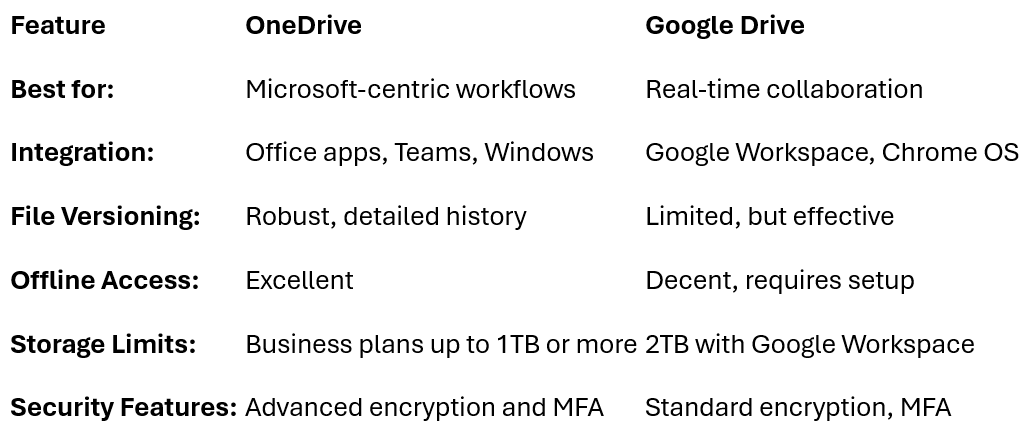
🥊 Head-to-Head Comparison
💡 Which Should You Choose?
Are you a Microsoft 365 user? Choose OneDrive.
Is your team rooted in Google Workspace? Go with Google Drive.
Do you need offline file access often? OneDrive’s sync client wins here.
Need real-time editing? Google Drive’s live collaboration is hard to beat.
🌟 Pro Tip. Don’t Overcomplicate
Many businesses use both. Store collaborative documents in Google Drive. Keep structured, secure files in OneDrive. It’s all about leveraging the strengths of each.
The bottom line.
Pick the platform that fits your existing tools and workflow. You’ll save time, reduce frustration, and make file management simpler.
See you next Tuesday for more tech tips!